



Massive Price Update Module
- Home
- »
- Massive Price Update Module
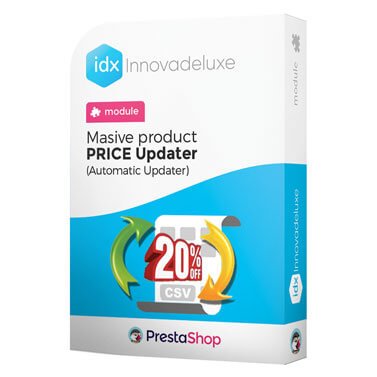
Massive Price Updater Module
Massive price updater for PrestaShop online stores, allows you to update each and every one of the prices of the products in your online store by increasing or decreasing them.
Compatible with:
PrestaShop 1.7.0.0 to 1.7.8.11 and 8.0.0 to 8.2.1
Includes 1 year of Business Care
(support and updates)

Contract the installation and configuration.
IDX takes care of everything
Recommended add-on module

Module for massive updating of product stocks
Complete module for updating the stock of products and combinations of your online store. You will be able to update the inventory in a very simple way.
Complete module for updating the stocks of a product and its combinations.
Products usually sold together
Module for massive updating of product stocks

PrestaShop GDPR (General Data Protection Regulation) Compliance Module
Advanced Multi-Product Import Module

Export orders / invoices to Excel module

Automatic Internal Linking Module for SEO

PrestaShop Cookie Law Compliance Module
Price change modalities
There are 3 price change modalities available
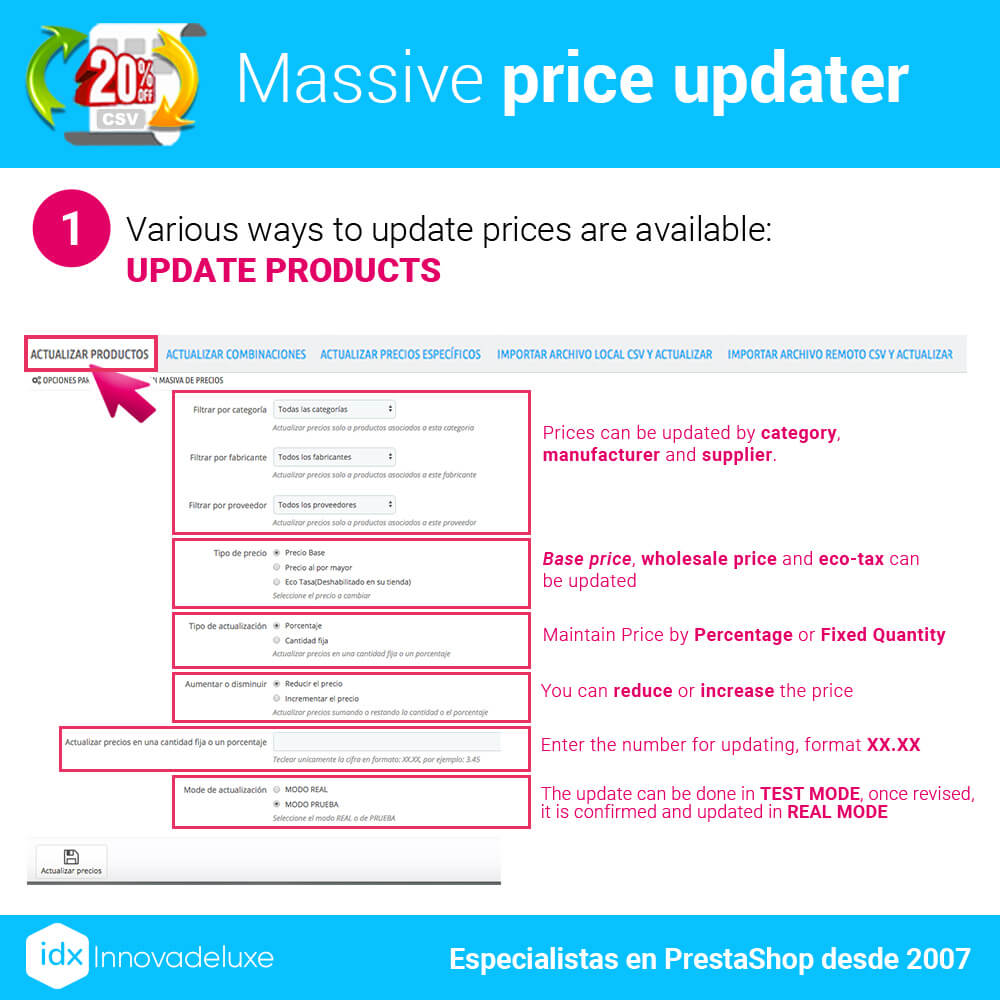
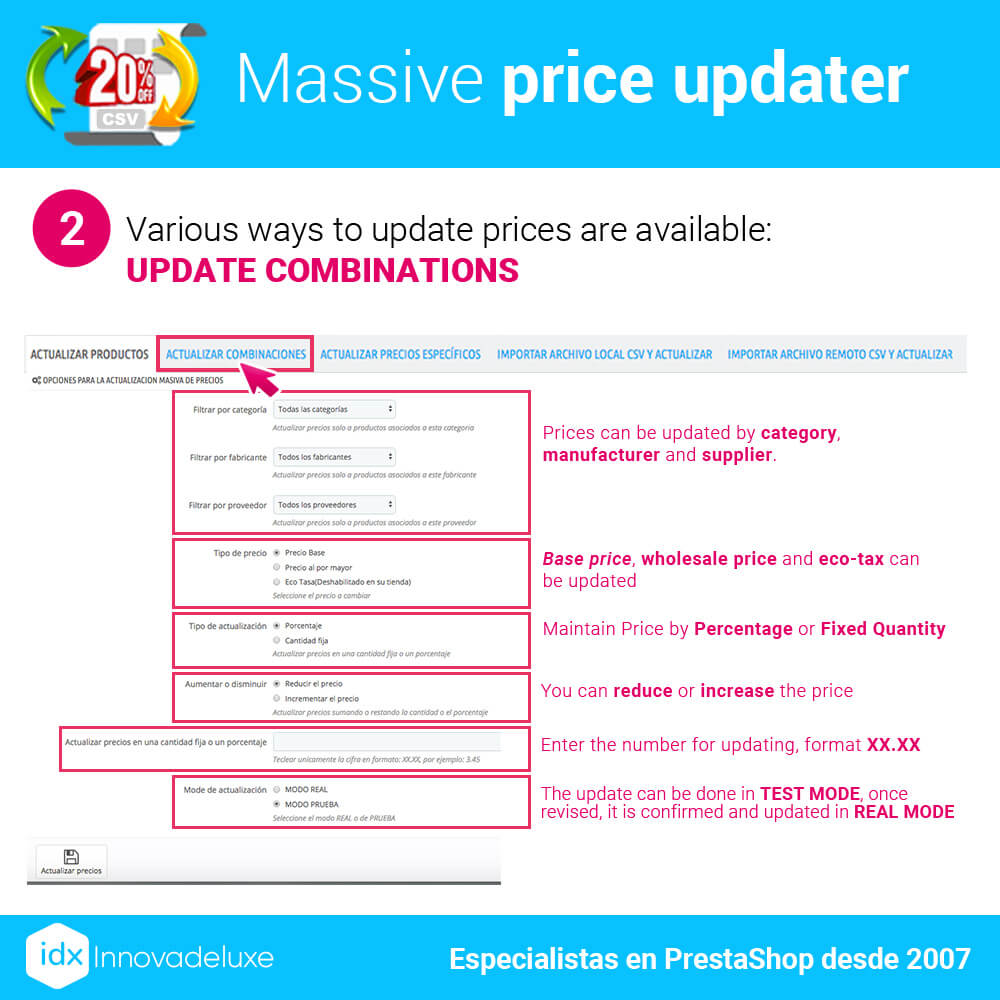
We give you all the options you need. You can easily change prices by applying a percentage to increase or decrease prices, or apply a specific amount of increase, for example 3€ extra to all products equally.
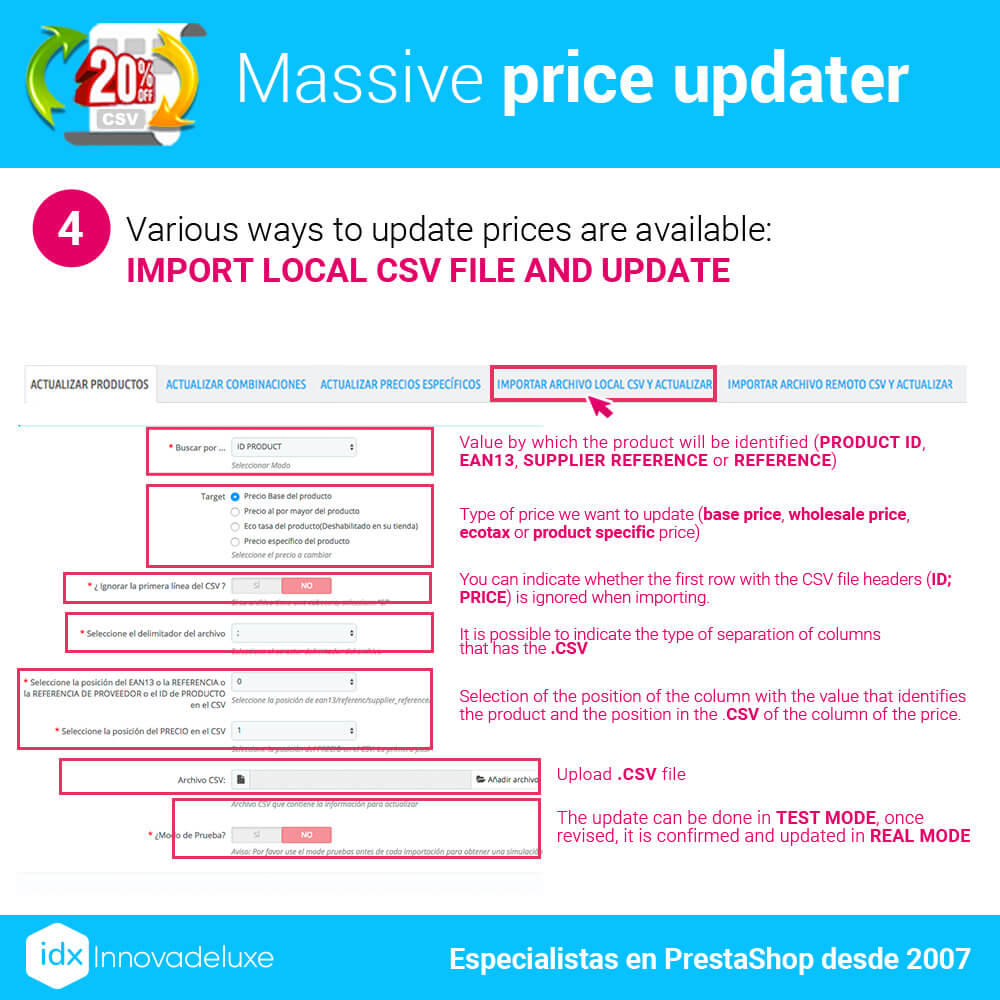
But if you need to go into more detail, you can use the CSV price change mode, in which you can enter the new price of each product and it will replace the existing price with the new one in the CSV.
Filters for price updates
You have 3 filters to update your product prices
When configuring the module to decide which products you want to change their price, you can filter it in three ways. You could for example increase by 10% all the prices of a category. Or reduce the price of all products from a supplier or manufacturer.
In an instant that product filtering will have taken place and the prices will have been changed on the appropriate products, bypassing the rest of the products in your catalog.
Price change modalities
It has 2 price change modes available
A very versatile module, which allows you to both reduce and increase prices based on the parameters you have configured or based on the data included in the CSV file that you upload to the module or automate to update periodically.
Modalities of work of the module
You have 2 working modes to execute price changes
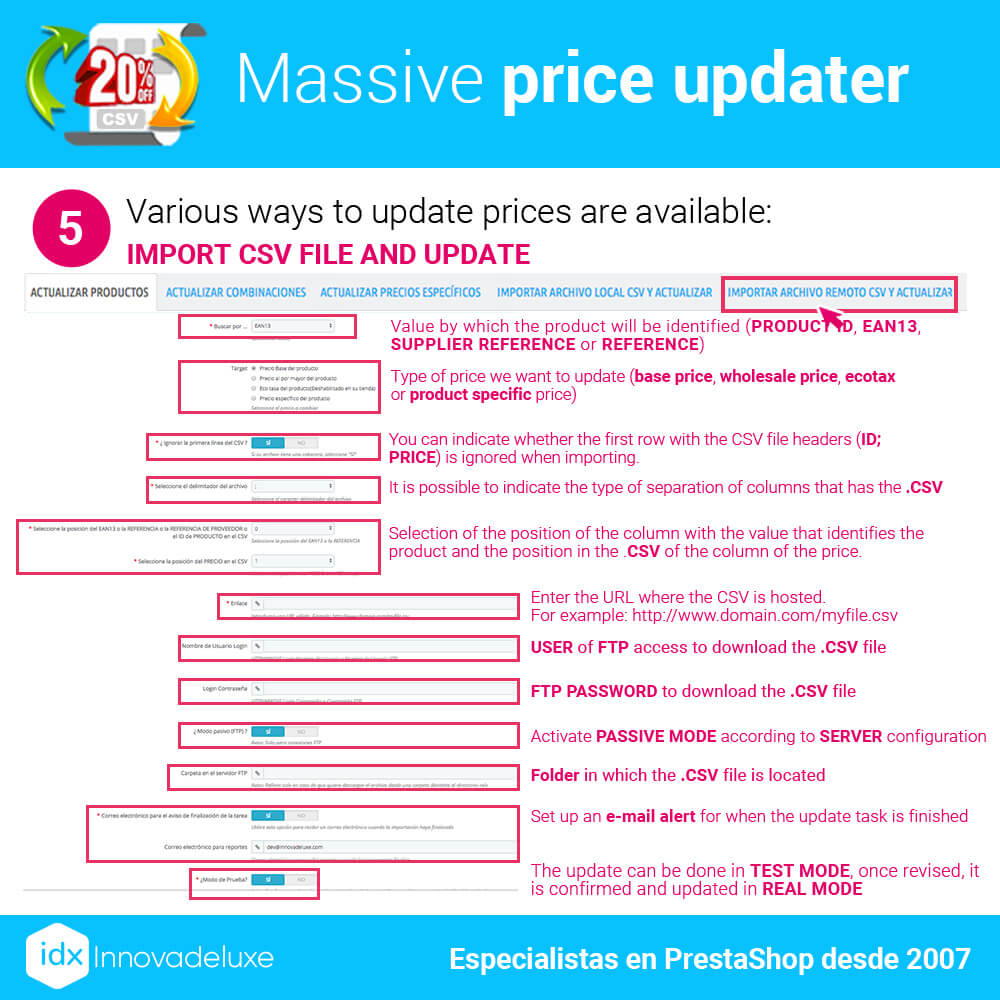
You can configure the module and test, to see if the result is as expected. To do this you have available in “Test Mode”, in which you do not change the prices in your store until you execute the same actions but in “Real Mode”.
Price update modalities
You have 2 ways to update prices
You can configure the module manually and apply these settings to execute the price update in the store.
Or you can create an automatic scheduled task (CRON) on your server, to update the prices as often as you need, calling a CSV file located on a remote FTP that is updated periodically.
Price identifiers for update from CSV
Has 4 identifiers to locate and update prices
1.) The reference can be used to identify the price of the base product as well as for combinations. Each product, or combination of attributes, must have a unique reference.
2.) The EAN13 code is also used to identify the price of the base product as well as for combinations. Each product, or combination of attributes, must have a different EAN code.
3.) The supplier reference can be used to identify the product price only, it cannot be used for attribute combinations. Each product must have a different supplier reference.
4.) The PrestaShop ID can only be used to identify the price of the base product, it cannot be used for attribute combinations.
If you need to update the prices of the products, you can use the 4 identifiers to indicate them in the CSV.
If what you need to update are the prices of the combinations of attributes of a specific product, you will have to have at least the reference or EAN in each combination and they must be unique in the store, they cannot be repeated in other products.
Update of specific prices from CSV
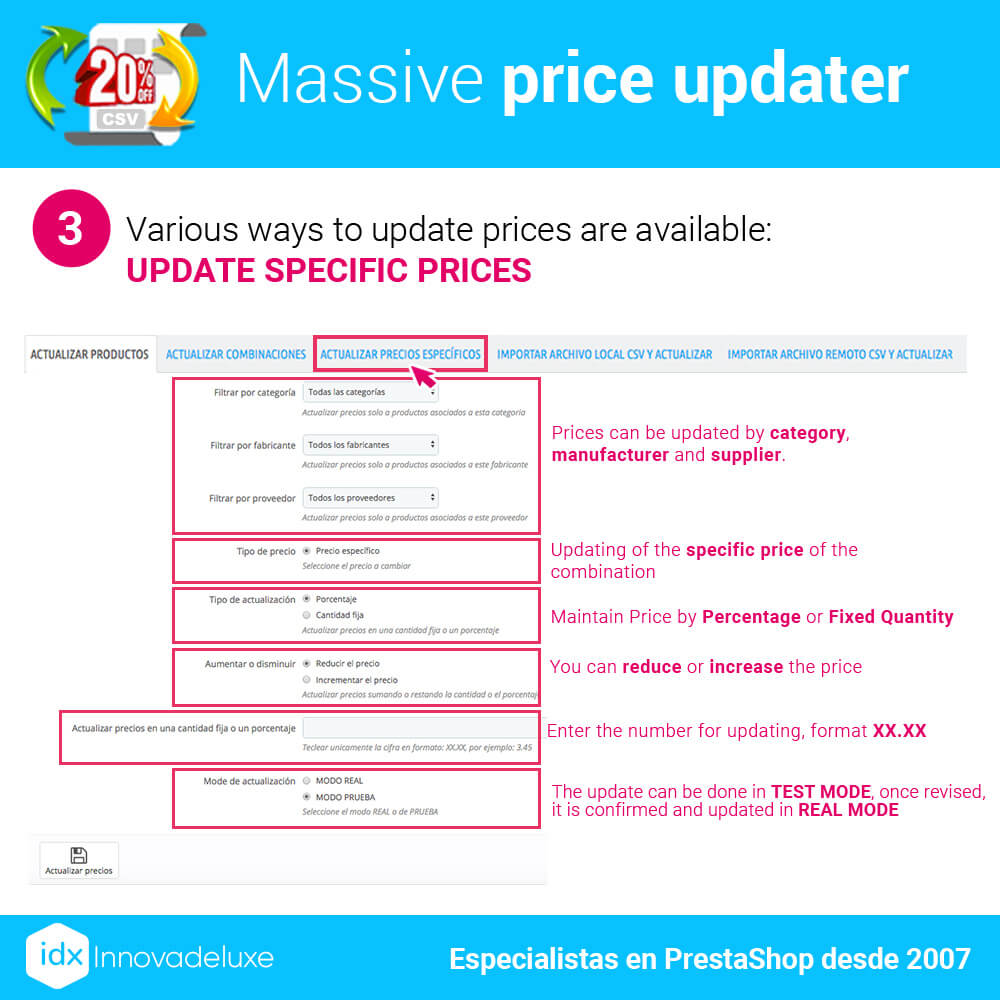
The module only updates (creates if it does not exist) general specific prices, i.e. without any restriction. You also have available an option to select the customer group and in that case it updates the general specific price of that customer group.
In other words, only update general specific prices or prices that are restricted to a customer group.
If the product has other specific prices, (restricted by customer, cart, country, currency, etc…) PrestaShop will automatically select the most advantageous price for the customer at that moment.If the product has other specific prices, (restricted by customer, cart, country, currency, etc…) PrestaShop will automatically select the most advantageous price for the customer at that moment.
Only value-specific prices are updated via CSV, not specific prices that are configured by percentage.
The best module to update or change prices in your store
Powerful module to update the prices of the products in your store massively. You can update the base price, wholesale, eco-rate, combinations and specific prices, by percentage, fixed quantity, from a local or remote CSV.
Powerful module to update any price in your store.
With this module you can have your store prices updated at all times in a very simple way, either doing it manually, importing from a file or even automating from a remote CSV file through a CRON task on the server.
You can make all kinds of price changes that you can think of and that you may need, the module covers all the official needs of a PrestaShop store. You can both increase and decrease the prices of products, combinations, specific prices, eco-tax, base prices and wholesale prices.
Price update modalities
There are 5 different modes to update the available prices