
Advanced Multi-importer product module
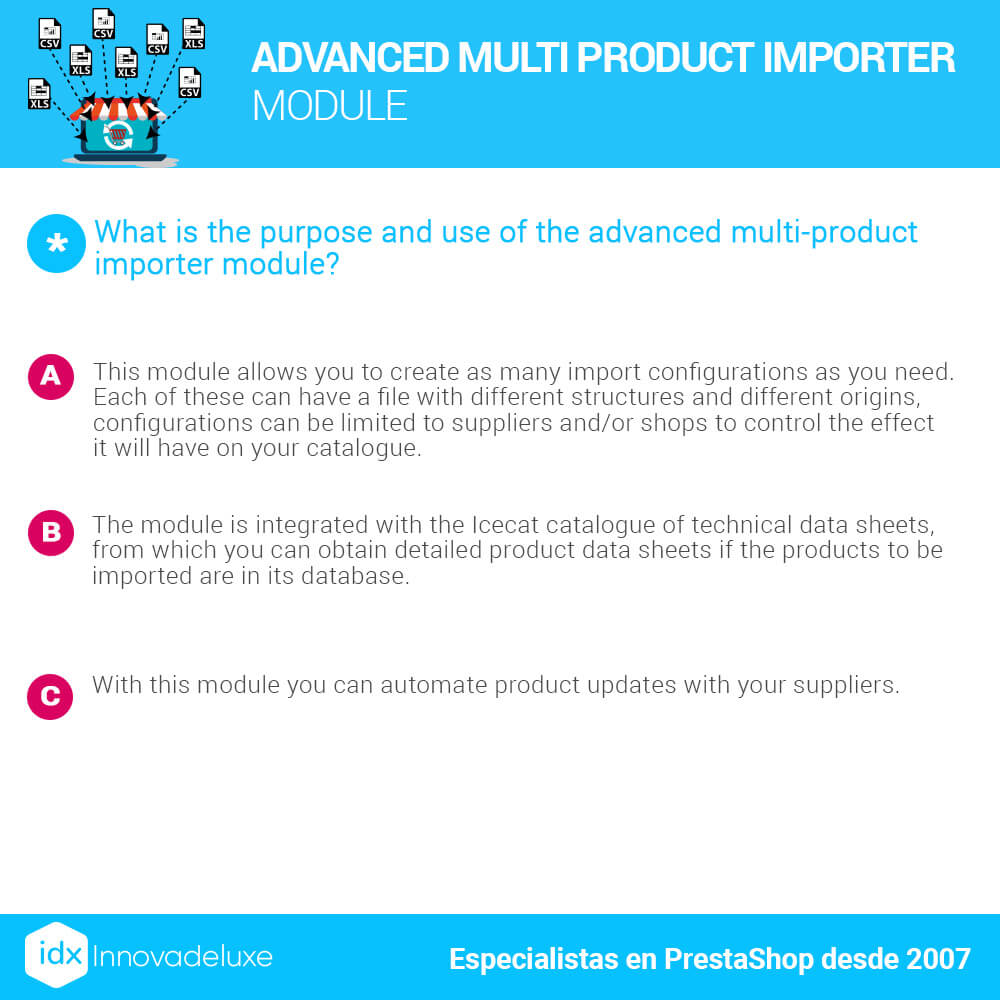
Advanced Multi Product Importer Module
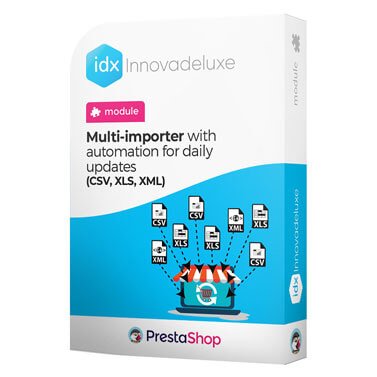
Module for PrestaShop to import from CSV file. It allows multi-imports from several files automating the updates with several modalities.
Compatible with:
PrestaShop 1.7.0.0 to 1.7.8.11 and 8.0.0 to 8.2.1
Includes 1 year of Business Care
(support and upgrades)

Contract the installation and configuration.
IDX takes care of everything
Recommended add-on module
Module for creating automatic internal links for SEO
A module to improve your shop’s SEO by helping the Google bot crawl your site more smoothly. You’ll be able to improve your project’s crawl budget by automating the generation of internal links.
A module that creates internal links within the shop, based on keywords, which link to the URLs configured for each page containing those keywords, without you having to do anything.
Products usually sold together
Module for creating automatic internal links for SEO

Module to comply with the Data Protection Act (RGPD/GDPR)

Store availability and product reservation module
Multi-Store Stock Manager Module
Module Sale of products by boxes or packs (Multiples)

PrestaShop Cookie Law Compliance Module
Powerful catalog importer from CSV and Excel
Powerful importer of product catalogs from CSV files. You will be able to make multi-imports from several different files, automating daily or periodic updates with several modalities.
It includes all the functionalities you may need to import your suppliers’ catalogs, or files created by yourself manually or by exporting from your ERP or similar management system.
You can also import from files created with Microsoft Excel in XLS or XLSX formats.
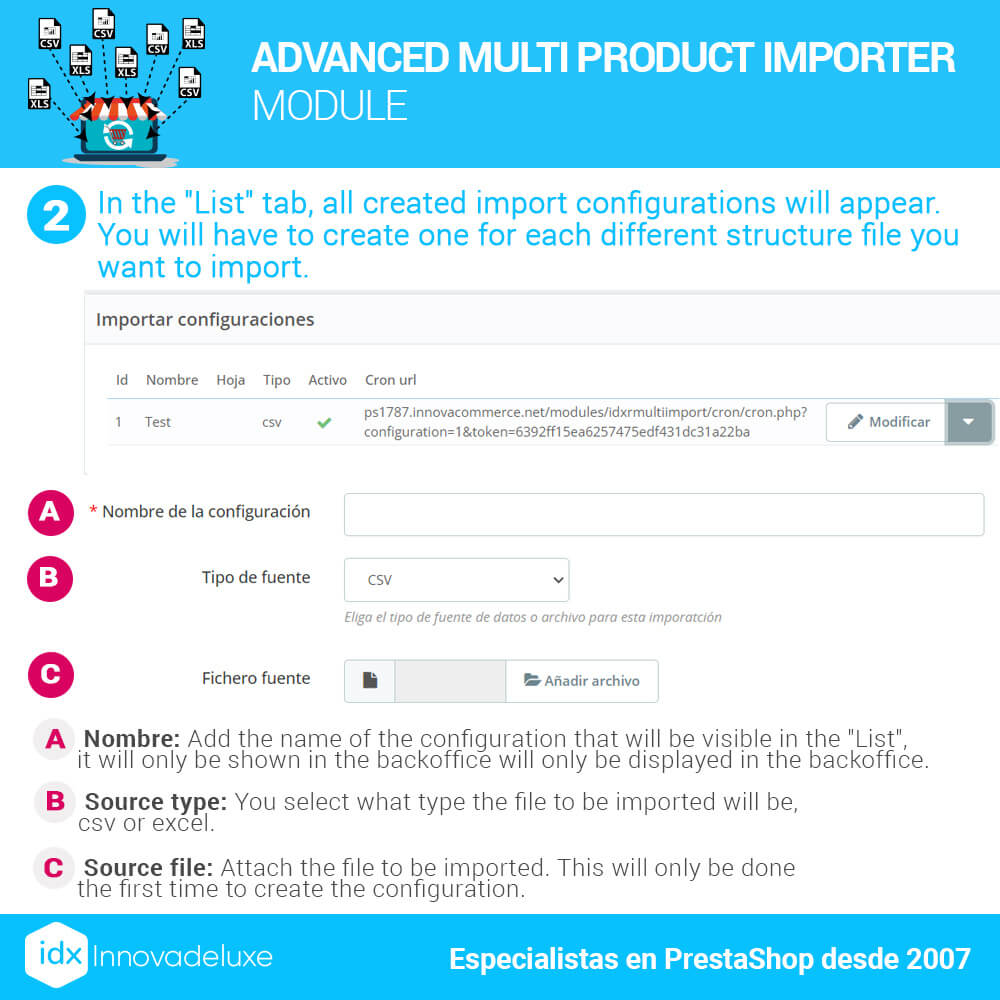
Different locations of the catalogs to be imported
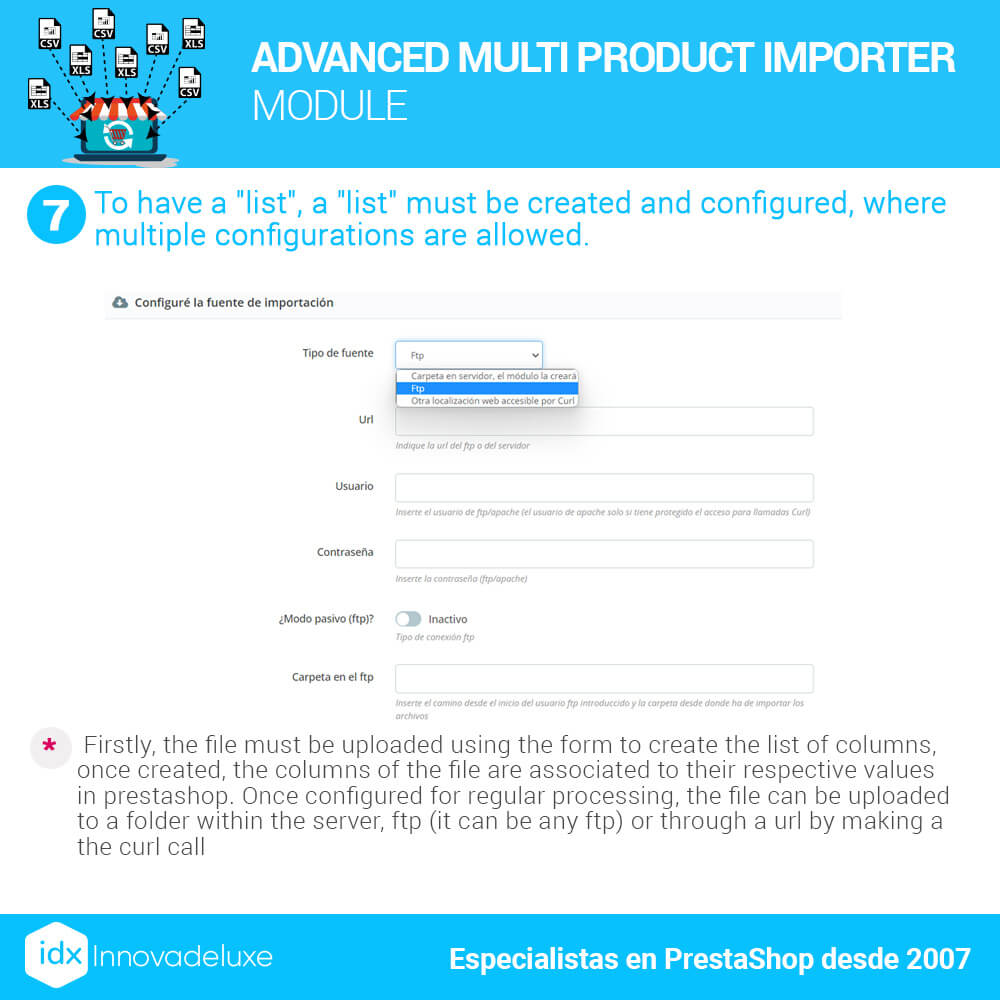
This module allows you to import CSV files from several different locations.
Image import
Product images are not imported at the same time as the rest of the data in the CSV file. The CSV data is imported immediately. Depending on the size of the CSV, it may only take a few minutes.
The images are imported in a parallel process that, depending on the size of the CSV file, can take several hours.
When importing images, you don’t just take the image from your supplier, you have to create all the image sizes that your store needs and there are quite a few of them.
This happens on the first initial data load, which is when the complete catalog is imported. When subsequent data updates are made, the images no longer have to be re-imported and therefore the process is very fast.
Images are only re-imported for new products that have been added to the CSV file by your supplier.
Additionally, we recommend installing in the store our module to configure predefined images by categories for when the products do not have images.
This module is very useful when working with supplier catalogs, since not all suppliers deliver 100% of the products in images.
For example, suppliers in the computer and technology sector, in a very high percentage of products, do not include images.
If the products do not have an image, you will give a very bad impression to your customers and it will be difficult to sell.
Catalog import from ERP
Although it may seem that it is only suitable for importing from your suppliers, this is not the case. The module can import any type of CSV file of products, either from a supplier or generated from an ERP.
If you need to update your catalog data as you have it in your ERP, you can generate the CSV file and upload it to a folder on the online store server. You can automate a daily import using a CRON task on your server to run the import at the time you need.
You can also make it run instantly if you want to proceed manually without a CRON task.
Import from Dropshipping suppliers
This module is specially designed to work with Dropshipping suppliers.
It will allow you to import your supplier’s catalog and adjust it so that it is displayed in the best way in your store.
You will be able to import, assign to your categories, add profit margins and automate daily updates. Everything you need.
In addition, you will be able to import several different catalogs from several different suppliers.
Multi imports with different configurations
This module is in use in stores that are importing daily more than 50 different files from different suppliers. It is being used by several computer wholesalers with more than half a million references in their stores.
You can create completely different imports depending on the SCV file to be imported.
Each supplier provides its catalog in a totally different way, for that reason, this module is able to adapt the settings for each CSV file so that you can import it.
CSV data mapping to PrestaShop database
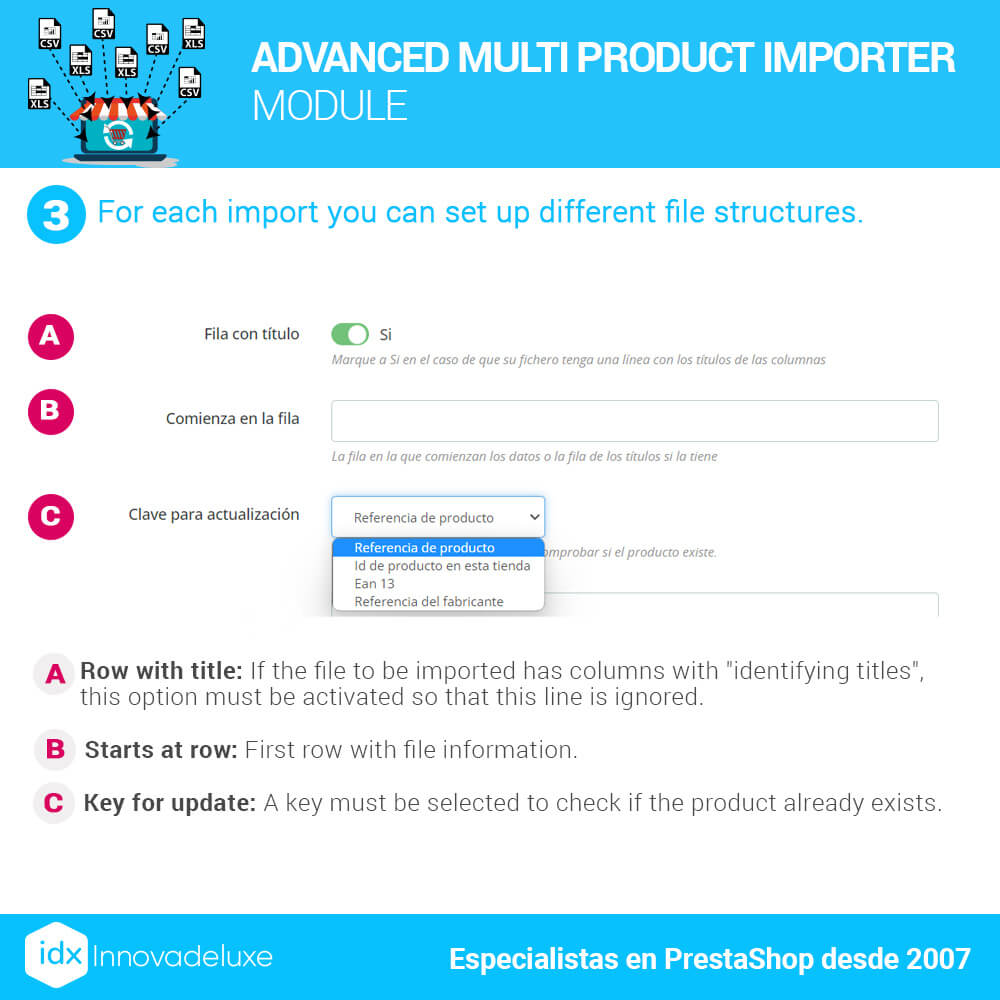
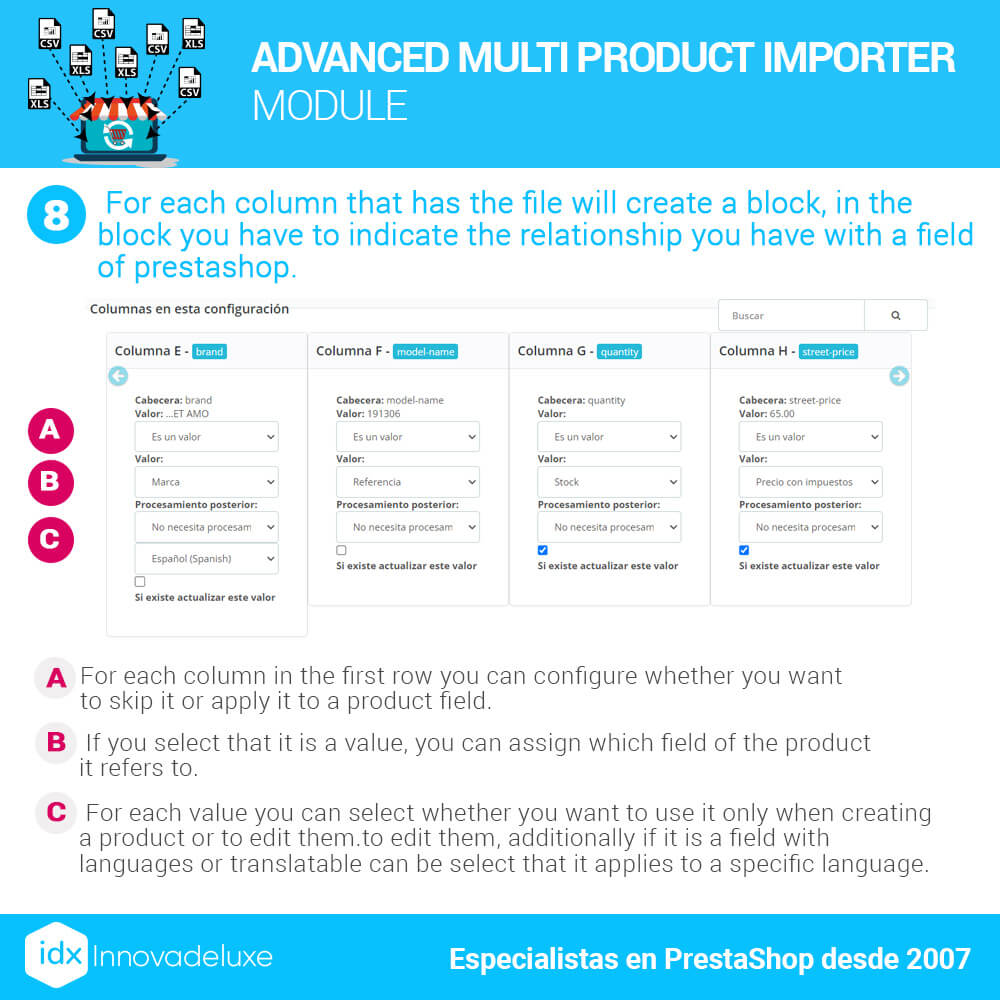
The module allows you to map fields from CSV files to fields in the PrestaShop database of the product sheet.
The module, once the CSV file to be imported is configured, will read the columns included in it and will allow you to associate each column of the CSV with a field of the product database.
Once this field association is done, the CSV can be imported in the appropriate form.
Association of CSV categories with those of the online store
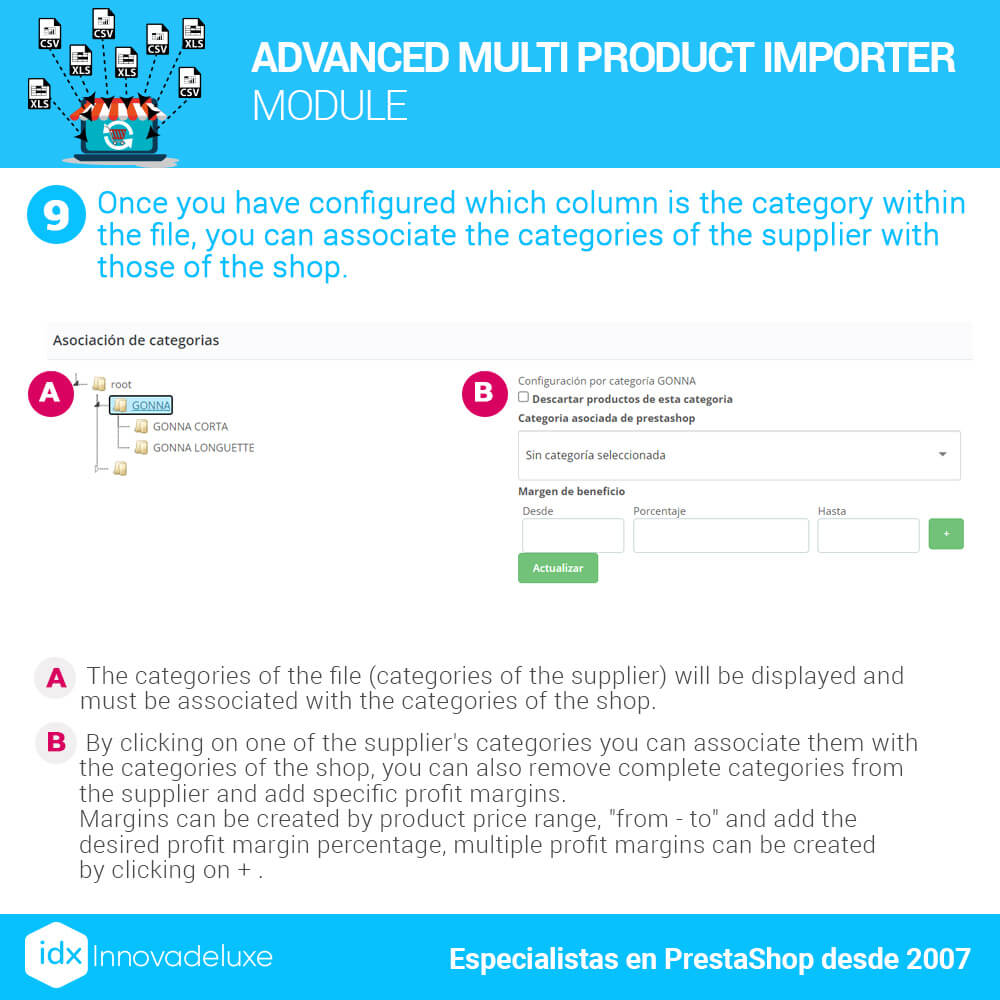
The module allows you to decide which CSV product categories are associated with which PrestaShop product categories.
It is very common for suppliers to catalog products into categories according to their interests. But these category interests are usually not suitable for an online store.
You have probably created an internal linking architecture in your store to optimize the Crawl Budget for the search engine bot, to improve the indexing of your URLs and increase your SEO.
If you have done that, using your provider’s categories would wreck your entire SEO strategy.
You will have it solved by making the necessary associations between categories, to import the supplier’s categories to the ones that best suit your needs.
Association of products in the CSV with those in the online store
Assigning products from the CSV file to different categories of your PrestaShop store is allowed.
Suppliers usually only associate each product with a single product category. That’s fine for them, but probably not for you.
In an online store, a product is usually displayed in a main category and in many cases, it is also displayed in some additional subcategories.
In the store there can be several different types of categorizations, to respond to the way your customers browse your store or search for products. This way you improve usability and increase conversions.
You will be able to include the products in several different categories if you need to.
Integration with ICECAT data provider
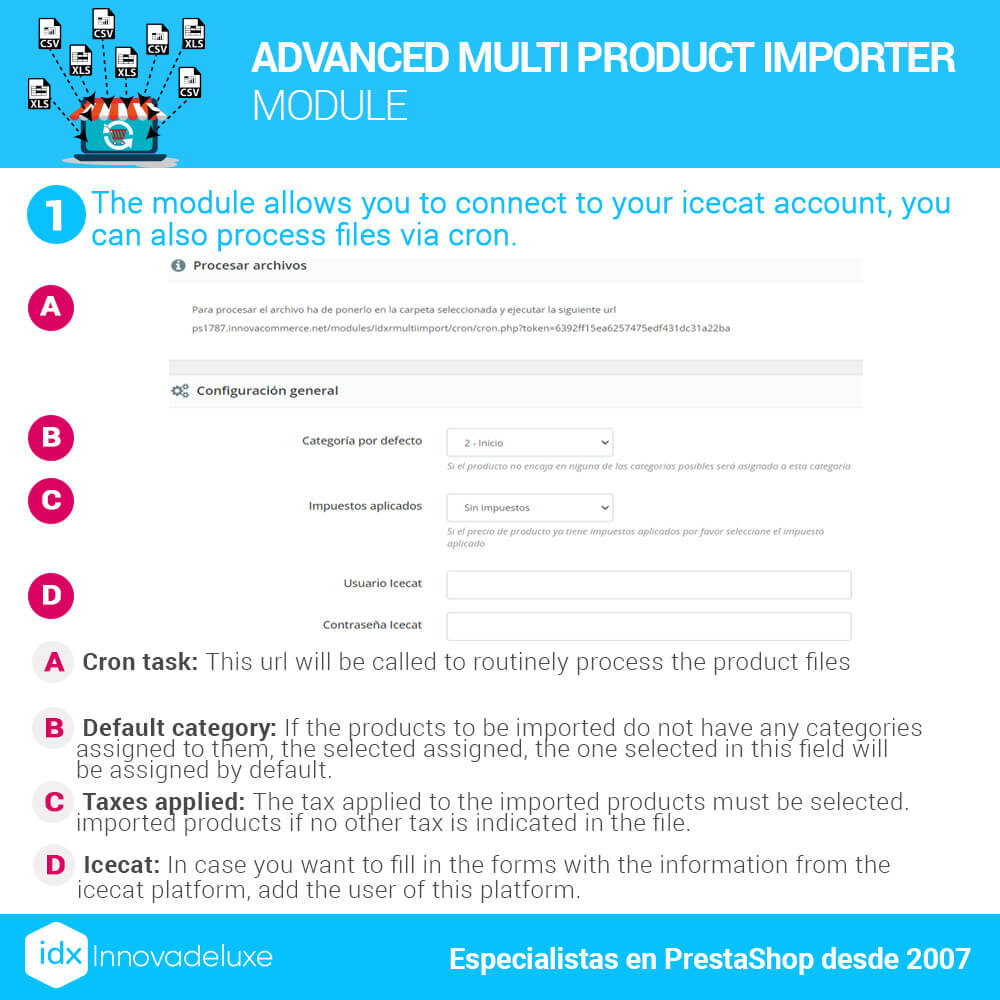
This import module is integrated with ICECAT. ICECAT is a professional portal that offers product sheets (descriptions, images and data sheet) for online stores.
In some industries, product suppliers offer catalogs with very little data. They often do not include detailed descriptions, images or technical data sheets. This makes it almost impossible to sell these products.
ICECAT solves this problem, since it offers very complete product sheets so that you can import them to your store.
This import module is compatible with both the free version of ICECAT and the paid Premium version.
The module creates a parallel import process in the background, to gradually import the information from ICECAT to complete your products with as much information as possible so that you can sell them.
Powerful periodic data update system
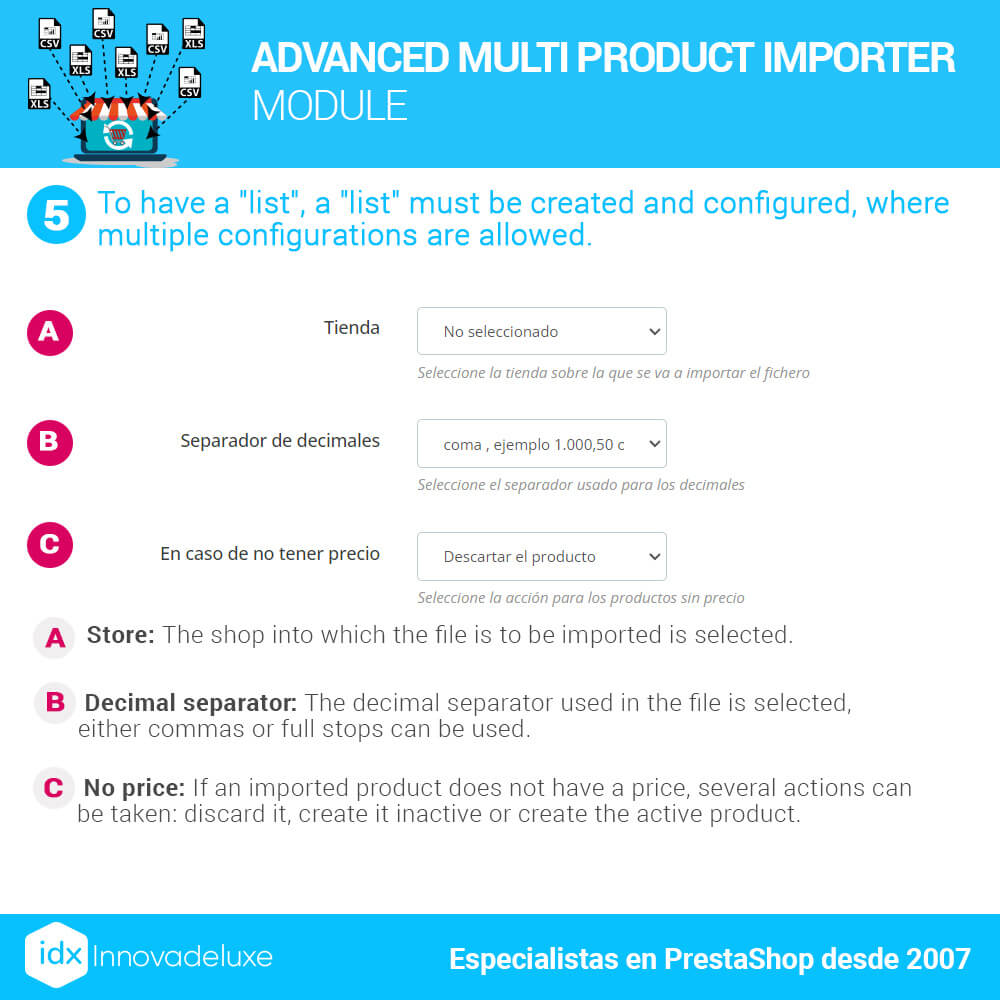
The first CSV data load can be slow due to the amount of data to import. That is the first process you should do.
You can then set up CRON jobs on your server to update your PrestaShop database with new imports from the location you have configured for the CSV file.
You can create a CRON task that updates prices and stock. If your supplier has a lot of fluctuation in stock and even prices, you can have this data updated several times a day.
You can create a CRON task to import the new products that the supplier has added to the CSV file. This task can be scheduled to run at night, so that it does not consume a lot of server resources when you have your customers shopping.
Along with the addition of new products, you can also deactivate all products that are no longer available in your supplier’s CSV file, as these products are probably no longer available for sale.
Keep in mind that the more import processes you have simultaneously or during the day, the more resources you will consume from your server. Especially if you do it when your customers are shopping at the same time.
Add what you would like to earn in order to increase imported prices
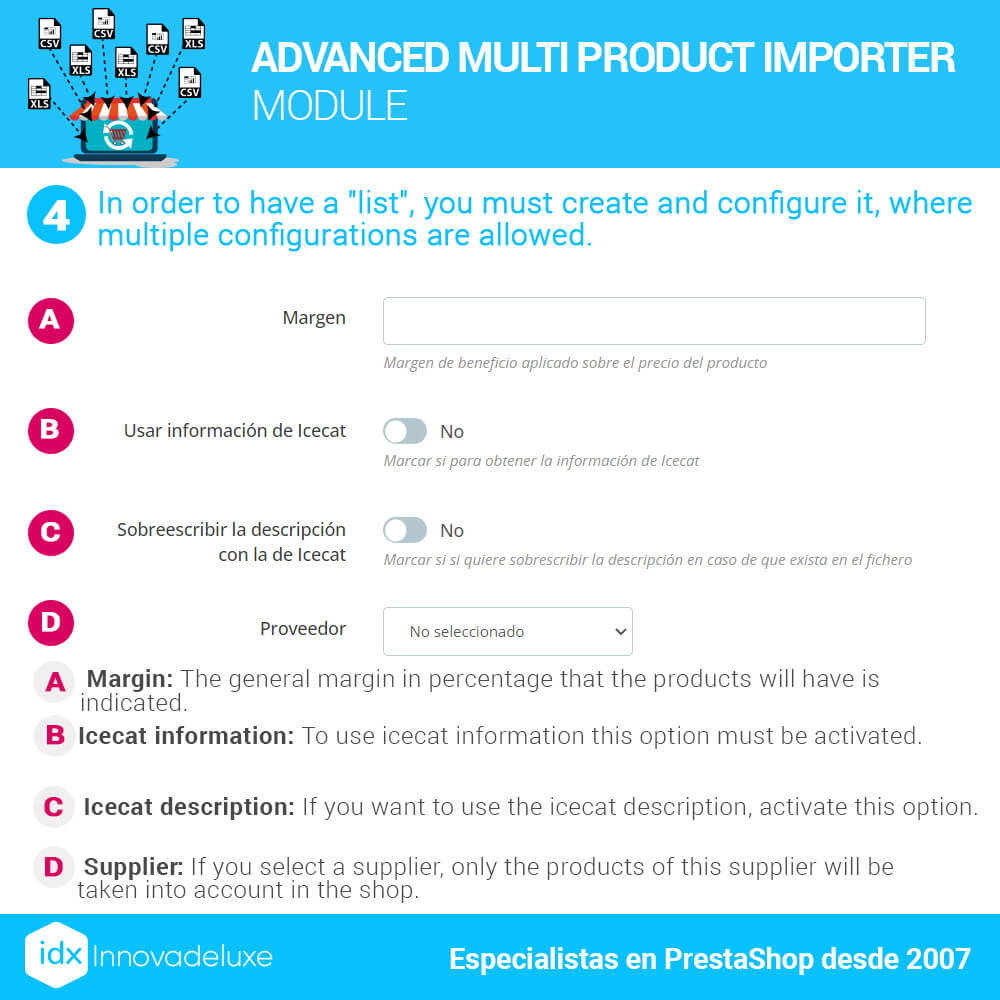
Includes functionality to add profit margins to increase the selling prices of products.
Your suppliers will give you their catalogs with the price at which you buy from them. So you will need to edit all your products to add the price at which you want to sell those products. But that is unfeasible if your catalog is very large, it would be crazy. You would have to spend countless hours of work.
For that reason, you have a functionality in this module that will allow you to add a profit margin to the products and it is done automatically at the same time that the import is done.
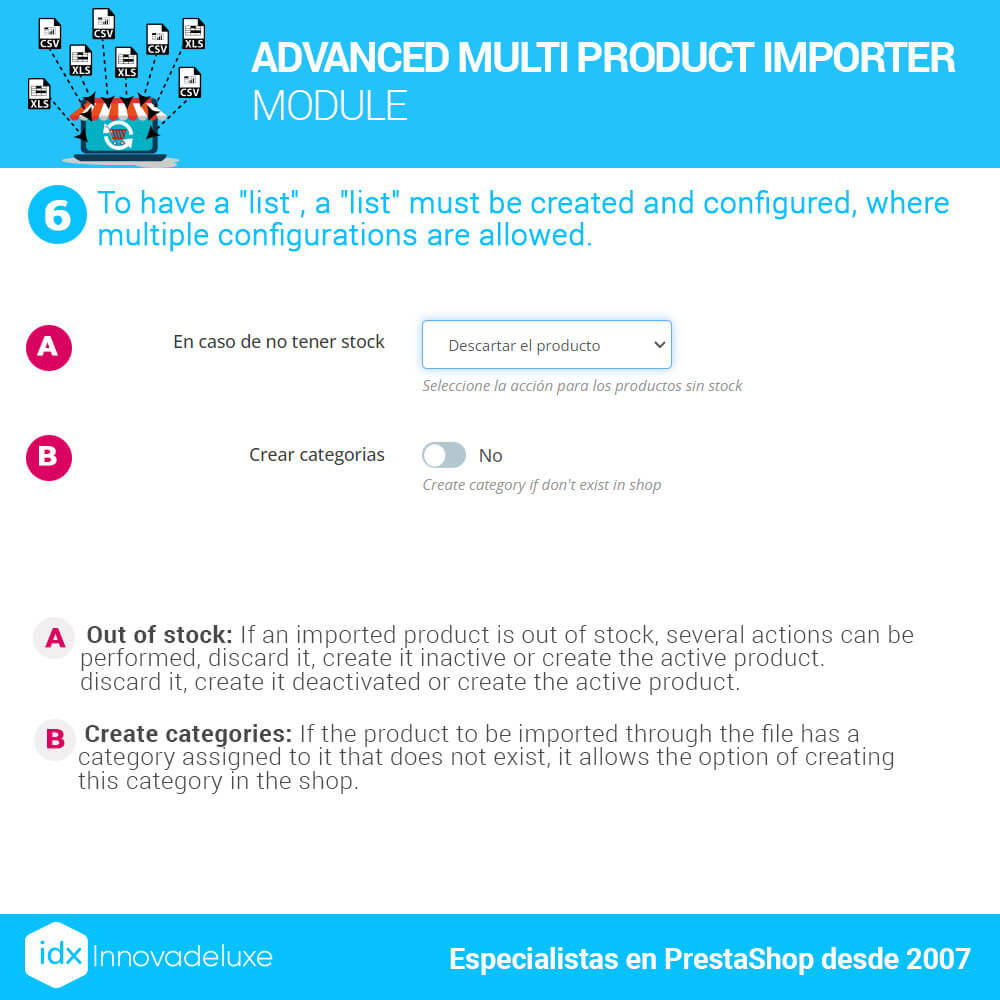
You will be able to indicate which is the price column of the CSV, which will be used as the base price to calculate the sales prices once the markup previously configured before importing has been applied.
You will be able to set a different profit margin for each category of products to be imported.
If your supplier provides you with another column with the recommended selling price and you want to use it as your selling price, then you do not need to use the markup functionality. You will only have to set this column as the product price and you are ready to import.
Import speed
The speed of the import will depend largely on the RAM and processor resources your server has and the configuration you have for your import.
Importing one image per product is not the same as importing 8 images per product.
If you add to that the use of ICECAT, the process can be a bit slow. ICECAT is a system that can slow down imports quite a bit, as it is an external server that limits the import speed.
Savings in working hours
With this import module you will save many hours of manual work.
You won’t have to can your products by hand. If your catalog is large, that would probably be unfeasible.
If your supplier has changed prices and you need to update them, with this module you will be able to do it in just a couple of minutes.
Whenever you have to change a product tariff, it can take many hours to do it manually. With the importer it only takes minutes.
If you need to make any kind of massive changes in your catalog, you will only have to create a new import process to update the database fields you need and it will be done in a very short time.